Custom software for commercial maintenance companies

Managing work orders, subcontractors, and reporting across multiple clients and locations? We build custom software and integrations that fit the way your business already runs.

We build

  • Work order integrations
  • Office & dispatch tools
  • Offline field apps
  • Client reporting automation
See how we can help ↓

Trouble loading the calendar? Open the booking page in a new tab

30-min call · no pitch · usually reply same day

Built for companies that maintain

Commercial propertiesRetail storesRestaurantsTelecom sitesBank branches & offices
The problems

Where maintenance operations get complicated

The work in the field is hard enough. These are the parts that eat up office hours.

Work orders arrive from every direction

One client sends jobs through ServiceChannel, another through Corrigo, a third by email. Someone in your office copies each job into your own system, then copies the updates back out.

What helps

Where a platform's API and your client's approval allow it, an integration can pull jobs into one queue and send status back, so fewer jobs get typed twice.

How contractors manage work orders across client portals →
Subcontractors are hard to keep in step

You assign the job, then chase the sub for an arrival time, photos, sign-off, and an invoice, by text, email, and phone.

What helps

A subcontractor portal can show each sub only their own jobs and collect their updates, photos, and paperwork in one place.

Field teams need the job, even without signal

Technicians need the scope, site history, checklists, and a way to capture photos, often on rooftops, in basements, or at remote sites with weak coverage.

What helps

A field app built around your jobs can keep work on the device and sync when the connection comes back. We've built one that works this way.

Every client wants a different report

One client wants before-and-after photos on their own form. Another wants a checklist and a signature. Another wants a monthly summary. Each one gets built by hand.

What helps

When field data is captured the same way every time, each client's report can be generated from it instead of assembled in the office.

How we help

We start with the simplest fix that works

You don't have to replace the software you rely on. Often the most useful step is connecting or extending it. We recommend a custom application only when an integration or automation won't do the job.

Software integrations

Connect client work order platforms, your field service software, and your accounting system, so job details move between them without retyping.

A good fit when: Your team enters the same job in two or more systems.

Custom internal applications

Office tools for dispatch, work order tracking, subcontractor coordination, and the admin work your current software doesn't cover.

A good fit when: Spreadsheets and email are holding the process together.

Mobile field applications

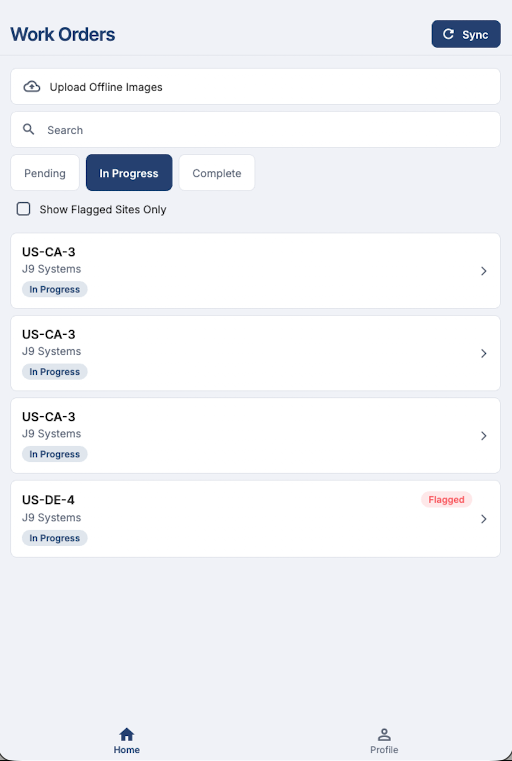
Apps for technicians and subcontractors to see job details, follow checklists, and capture photos and completion evidence, with offline support where sites have poor signal.

A good fit when: Proof of work gets lost between the site and the office.

Reporting and workflow automation

Produce each client's completion reports from field data, and automate the repetitive steps between finishing a job and invoicing it.

A good fit when: Your office rebuilds the same reports by hand every week.

Experience

Experience building office and field software for real-world maintenance operations

We built the office and field software for a company that maintains telecommunications sites and commercial properties. It follows a job from the office, to the technician or subcontractor on site, and back.

That's one delivered project, not a long client list. It's where we learned the hard parts: photos taken with no signal, what each subcontractor should and shouldn't see, and reports that shouldn't need retyping.

What we delivered

  • Office work order management
  • Technician and subcontractor assignments
  • Offline mobile field workflows
  • Photo evidence collection
  • Timestamped field documentation
  • Administrative reporting
Selected work

Recent builds, from field apps to internal portals.

Trusted Service Solutions preview

Trusted Service Solutions

Field app + portal

Field-service app for crews inspecting cell towers — capture photo evidence on site even with no signal, then sync to an internal portal shared by TSS and their clients.

FlutterOffline-firstSupabase
Lumost preview

Lumost

Logistics platform

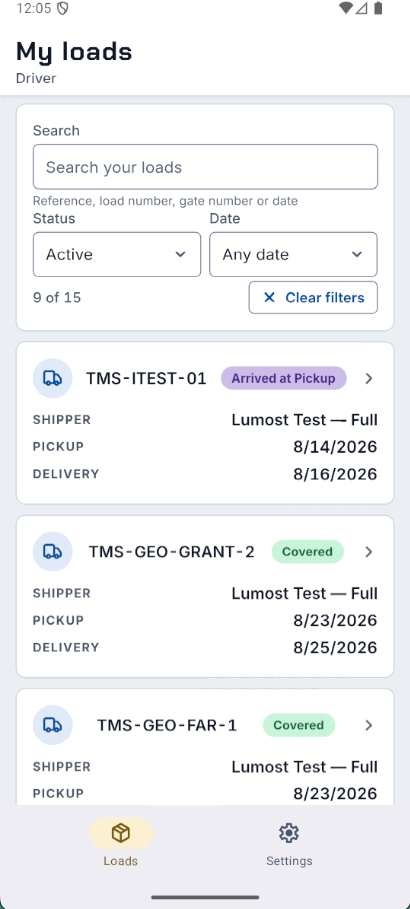
The load board, the truck's live location, and the delivery paperwork in one place — so a farming shipment goes from booked to delivered without a single check-in call.

Next.js 15React Native / ExpoTypeScriptTailwind CSS 4
Adam Labs preview

Adam Labs

Internal portal

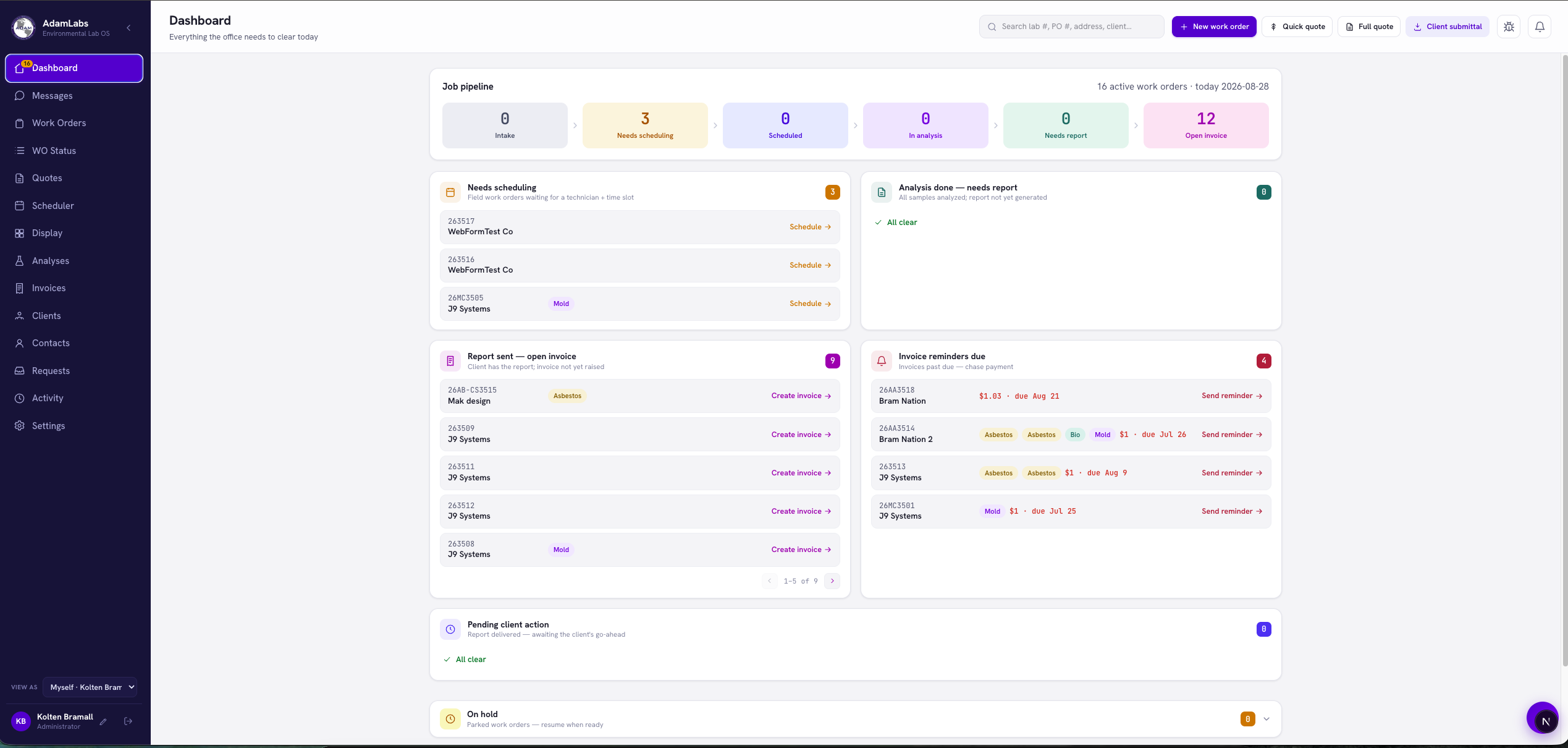
Internal portal for a testing lab: sample intake, automated client report generation, and Stripe invoicing in one workflow.

Next.js 15TypeScriptTailwind CSSStripe
How it works

Three steps. No long process.

  1. 1

    Book a call

    Pick a time above. Walk us through how jobs move today: where work orders come from, who does the work, and what your clients need back.

  2. 2

    We recommend the simplest fix

    We send a short written proposal. It might be an integration, an automation, an extension to what you have, or a custom build. Fixed scope, timeline, and price.

  3. 3

    Build & ship

    You get regular updates until it's done, and you own the code.

Kolten
About

Hi, I'm Kolten.

I've spent the last 5 years shipping software, working directly with business owners and their teams, including the office and field tools for a maintenance company. I do the design and the engineering, so there's no hand-off gap and no telephone game.

I work with a small number of clients at a time so the person you talk to on the call is the person writing the code.

  • 5+ years building for the web
  • Design + full-stack in one person
  • Fixed scope, fixed price — no hourly billing
  • You own the code and accounts from day one
Field Notes

Guides for maintenance contractors

Plain-language articles on the software decisions maintenance companies face.

All articles →
FAQ

Questions maintenance companies ask

Do we have to replace the software we already use?

No. Usually the better move is to connect or extend what you have: an integration between two systems, an automation, or a small tool that covers a gap. We'll only suggest a custom application when that's the simplest way to solve the problem.

Can you connect to ServiceChannel, Corrigo, or our clients' other portals?

Often, but it depends on the platform. Most offer API access with conditions, such as fees, membership levels, and each client's approval for what the integration may do. We check what's possible for your clients before we quote anything.

Can a field app work where there's no signal?

Yes. We've built a field app that stores job data and photos on the device and syncs them when the connection comes back. What needs to work offline is one of the first things we'll ask about.

How long does it take?

A brand-new project usually takes about two months from kickoff to launch. Smaller builds and add-ons move faster. You'll get a real timeline in the proposal before anything starts.

Who owns the code?

You do — from day one. Everything lives in your GitHub, your hosting, and your accounts. No lock-in and nothing held hostage.

Do you do ongoing work?

Yes — some clients keep me on a light monthly retainer for changes and new features after launch. Entirely optional.

What if we're not a fit?

Then I'll say so on the call and point you somewhere better. The 30 minutes is free either way.

Need custom software for another industry?

We also build custom web applications, mobile apps, and business automation tools for companies outside commercial maintenance.

Book a call